
Launch day checklist
Pre-load now if your store region is Korea, Taiwan, Hong Kong or Macao, log in at 00:00 KST on November 26, and spend the first hour on the main quest chain instead of the cash shop.
The client is downloadable, the countdown is running and the launch hour is fixed at midnight in Seoul. What remains is the part nobody plans for: which store holds your account, whether the pre-load actually finished, and what you do in the first ten minutes after the servers open. This checklist runs backwards from 00:00 KST on November 26.
T-minus 48 hours
Work the list in order. Each step is reversible except the last one.
- Confirm your store account region. Open Google Play or the App Store on the device you will play on and check the account country. The game only sells in Korea, Taiwan, Hong Kong and Macao, so an account registered elsewhere will not show an install button at all.
- Start the pre-load on the platform you intend to use first. Android and iOS install through their stores, PC installs through Google Play Games for Windows. Nexon opened pre-loads on November 20, so there is no queue advantage left, only a bandwidth advantage.
- Sign in with the account you want to keep. A Google account carries the Play install, the PC install and the pre-registration state; an Apple account is separate. Switching later means starting the reward question again.
- Turn on the in-game notification permission. The Play listing lists notifications as an optional permission, and on Android a blocked notification channel is the usual reason people miss a maintenance notice on day one.
- Free the storage the client will need. Nexon has not published a download size, so measure the free space after the pre-load finishes rather than guessing beforehand. If the install reports an error near the end, storage is the first suspect, not the network.
- Put the local launch time in your calendar with a 15 minute warning. Use the table below rather than converting in your head at 3 a.m.
The launch hour on your clock
Midnight Korea time is fixed by Nexon's own countdown page. Everything else in this table is arithmetic done from that marker by the trade press, and MobileNApps is explicit that the midnight hour itself comes from Korean reporting rather than from Nexon's written release.
| Zone | Local time | Date |
|---|---|---|
| Korea (KST, UTC+9) | 00:00 | Nov 26 |
| Taiwan / Hong Kong (UTC+8) | 23:00 | Nov 25 |
| Japan (JST, UTC+9) | 00:00 | Nov 26 |
| UTC | 15:00 | Nov 25 |
| US Eastern (ET, UTC-5) | 10:00 | Nov 25 |
| US Pacific (PT, UTC-8) | 07:00 | Nov 25 |
| Central Europe (CET, UTC+1) | 16:00 | Nov 25 |
Players in Taipei and Hong Kong get the awkward end of this: the servers open at 23:00 on the 25th, not at midnight. Players in Europe and North America get a daytime launch, which is the friendlier half of the same conversion.
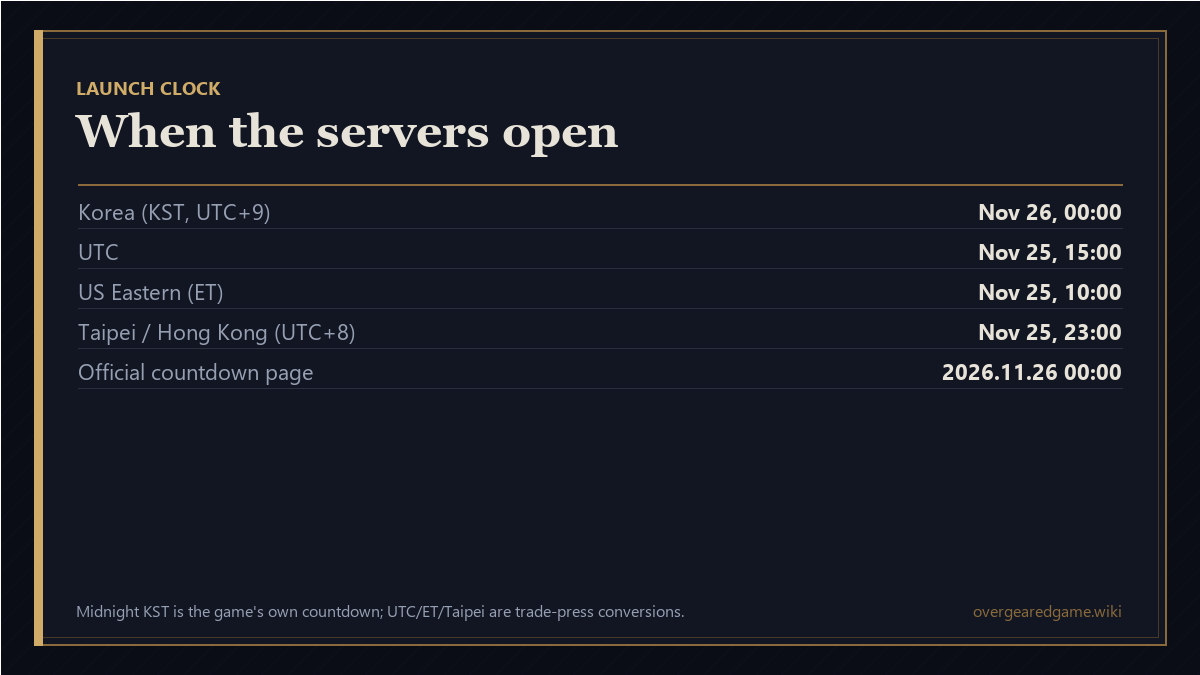
The countdown page states 2026.11.26 00:00. Other zones are conversions of that single marker.
Account and client checks
| Check | Pass condition | If it fails |
|---|---|---|
| Store shows the game | Search finds com.nexon.overgeared with an install or pre-load button | Account region is outside the four markets |
| Pre-load finished | Store shows "open" rather than "download" | Re-trigger on Wi-Fi; check free space |
| PC launcher signed in | Google Play Games uses the same account as your phone | Sign out and back in before launch, not during it |
| Notifications allowed | Permission granted for the game | Enable in system settings, not in game |
| Payment method | Only needed if you plan to buy on day one | Leave it unset for week one; nothing requires a purchase |
The last row is a real decision, not filler. Nexon's listing confirms in-app purchases and the ESRB note mentions random items, which means the shop can sell something with chance in it. Buying before you understand the material economy is the most expensive mistake available on day one, and the store will still be there on day eight.
The first ten minutes
The queue behaviour on Korean MMO launches is predictable: character creation and the first zone carry the load, so the useful move is to create a character quickly on a low-population server if the client offers the choice, then finish the tutorial chain without detouring. Server and character naming already ran once, on October 21, and Korean outlets reported all servers filling early, which tells you names are contested before the game is even live.
If the launcher crashes on first start, do the boring things first: restart the launcher, verify the install, then check the official Korean notice board. On launch night every guide is slower than the notice board.
Failure modes on launch night
| Symptom | Likely cause | Fix that costs nothing |
|---|---|---|
| Install button missing | Account country outside KR/TW/HK/MO | Stop; no legitimate workaround exists |
| Pre-load stuck at 99% | Disk space or a blocked download | Free space, retry on Wi-Fi |
| Client closes on launch | Launcher session expired | Sign out of Play Games and back in |
| Login queue at 00:00 | Expected on a Korean midnight launch | Wait, or create a character on a lower-load server |
| Can't read the interface | Official footage shows Korean UI | See the language page before you commit |
Nexon has not announced
Download size, PC and mobile requirements, cash shop prices, server names, and whether all four regions open at the same moment. Any page that lists those numbers today is guessing. Come back after launch: they will be measured, not estimated.
Next, your first 90 minutes turns the opening hour into a route, and the PC install guide covers the desktop path step by step.